ChromeOS Flex Review
Reviewed by Howard Fosdick © 2026, first posted at RexxInfo.org, under open license CC BY-ND 4.0.
I've reviewed Linux Mint,
antiX,
and
Puppy Linux
as tools you can use to refurbish older computers and restore them to usefulness.
If you have an ancient dual core computer, antiX or Puppy can restore it into a useful rig.
For multicore computers, I choose Linux Mint with the Xfce user interface. It's fast, reliable, and runs well on mature machines. Most important, even those new to Linux find it very easy to use. You don't have to train a Windows user to use it.
Now there's another alternative to consider: Google's ChromeOS Flex.
What I'll call "Flex" is the counterpart to the Chrome OS that comes pre-installed on Chromebooks. Whereas Chromebooks give you the entire hardware/software package, Flex just gives you the software. The idea is that you can install it on older or low-end machines and make them fast and useful.
(There are, though, some differences between ChromeOS and Flex that I'll point out in this article.)
This article reviews ChromeOS Flex and compares it to Linux Mint/Xce.
What Flex Offers
So how does the Flex desktop look? It's like an Android cellphone, which makes it very easy to use. You won't have to train neophytes to use it --
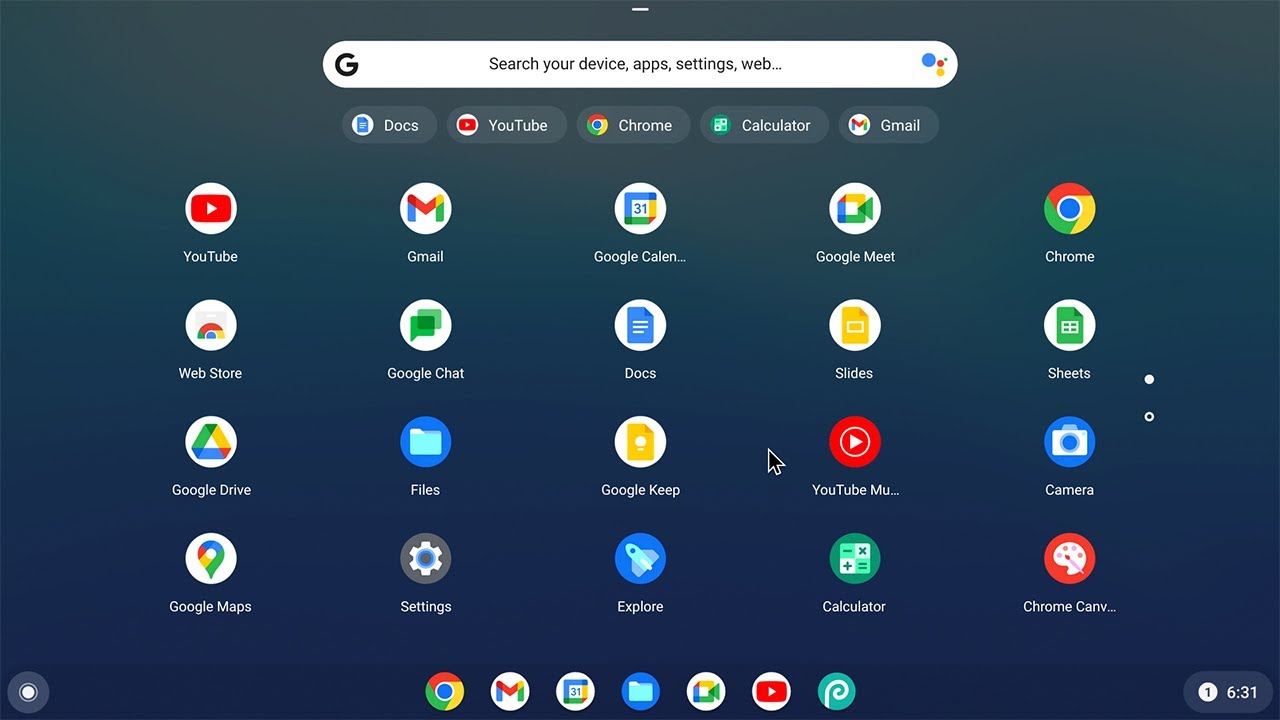
The Default Desktop (Courtesy: ExplainingComputers@Youtube))
You see a lot of useful apps there. But you'll also notice that all of them run in the browser. That's because Flex is a browser-only OS. It only runs web apps in a browser.
You can't install Android apps, or anything from the Google Play Store. Nor can you run Windows apps.
Benefits
So, Google's Flex is basically a locked-down system. You have to accept it "as is". I'd call it a "locked box."
Given that Google controls the software (and your user experience), that offers some great benefits --
* You don't have to train Windows users to use it
* Outstanding security
* Transparent automatic updates
* High reliability
* Users don't have to perform any maintenance or systems administration
Drawbacks
1. One downside is that you can't install apps. This OS is not extensible. You can't run Android, Windows, or Linux apps.
However, you can use Flex's included developer tool to install Linux on a virtual machine. (The default is Debian.) Then you can install Linux apps.
This is not hard to do. But it requires the user to set up and administer the VM and Linux, which obviates the main argument for Flex's ease of use via its simple Android interface.
Of course, if you refurbish a computer for the end user and do this work for them, it's probably not an issue.
2. Another downside to Flex is that it is a proprietary OS run by Google. Google ensures their control of "your" computer by requiring you to log into your Google account to use it. You'll use Google online apps, and store all your data on Google's servers.
Thus, Google watches everything you do. It sees all the websites you visit, all the images you view, all the documents you create, all the emails you send, and everything else you do.
(For more detail, this article explains the data Google collects. Google's My Activity gives you some degree of control over their data collection, while Google Take-Out allows you to download the data Google has collected about you.)
If your privacy is a concern, Flex is not a good choice.
Comparison
This chart compares Flex and Linux Mint (with the Xfce user interface) --
| Feature: | Google OX Flex: | Linux Mint / Xfce: |
| Security | Excellent | Excellent |
| Reliability | Excellent | Excellent |
| Transparent Updates | Yes | Yes |
| No User Administration | Yes | Nearly |
| Privacy | None. This is a surveillance system | Excellent |
| Requires Vendor Login | Yes, must log into Google account | No |
| Open Source | No. Google owns it | Yes |
| Price | $0 (Free download here) | $0 (Free download here) |
| Suitable for Old Computers | Yes | Yes |
| Installs on All Older Computers | Many (see supported hardware list) | Nearly all |
| Device Support | Many but not all devices (eg, no DVDs, Firewire, etc) |
Nearly All devices |
| Runs Android Apps | No | Yes with Anbox or Waydroid |
| Runs Windows Apps | No | Yes with WINE or other tool |
| Runs Linux Apps | Yes, but requires installing a virtual machine running Linux | Yes |
| Best For | Hassle-free use where the installed browser apps are all that's needed and privacy is not a concern | Offers a tailorable system if user wants to install additional apps and control his computer, his data, and his privacy |
Conclusion
So here's the bottom line.
Flex provides a free, fast, secure, reliable system that requires no user administration or support. It runs on many older computers and is an easy way to give them new life and restore them to usefulness.
However, you must be able to accept two big limitations --
* You must accept complete loss of your privacy to Google
If you choose to use ChromeOS Flex, here's what to do --
2) Check the End Of Support date for your box in that list, and make sure you're okay with it
3) Test the OS in "live mode" first to verify that it works with all your hardware and peripherals
Here are the install instructions at the Google website. Enjoy!
Related Articles
Here's how I refurbish computers --
The Ultimate Guide to Computer Refurbishing
The Ultimate Guide To Fixing Computer Hardware
How to Restore an Old Single Core Computer
antiX Review
Puppy Linux Review
Why I Refurbish with Linux Mint
Dont' Refurbish with Windows!
Linux --
How to Identify Linux Performance Bottlenecks
How to Upgrade Linux PC Hardware
How to Shrink PDF Files
How to Traverse Directories in Scripts
How to Use PUSHD and POPD
Reclaim Big Disk Space by File Conversions
Linux Performance Tips
Bash to Python Mapping & Comparison
====> Like this free article? Please spread the link love to Slashdot, LXer, or wherever. Thank you.
Back to RexxInfo.org